

Two different language settings
These are easy to confuse, and they behave very differently.
The short rule: fix the transcription language when the transcript is wrong, and use translation when only the reader has changed.
See the full list of supported languages
See the full list of supported languages
Afrikaans, Arabic, Armenian, Azerbaijani, Belarusian, Bosnian, Bulgarian, Catalan, Croatian, Czech, Danish, Dutch, English, Estonian, Farsi, Finnish, French, Galician, German, Greek, Hebrew, Hindi, Hungarian, Icelandic, Indonesian, Italian, Japanese, Kannada, Kazakh, Korean, Latvian, Lithuanian, Macedonian, Malay, Mandarin, Marathi, Nepali, Norwegian, Polish, Portuguese, Romanian, Russian, Serbian, Slovak, Slovenian, Spanish, Swahili, Swedish, Tagalog, Tamil, Telugu, Thai, Turkish, Ukrainian, Urdu, Vietnamese, Welsh.
Translating notes for a colleague
Once your call is transcribed, you can translate your notes into any supported language, making it easy to share insights with colleagues who speak a different language, no matter the language originally spoken during the call. You can translate your Notes and TLDR summary into another language at any time. This doesn’t change the original transcript — it just updates how the notes are displayed, so you can switch back, or translate the same call differently for two different readers. Click onTranslate and select a language from the dropdown to translate your notes.

Calls with more than one language
Metaview can follow when a call moves between any of these languages: English, Spanish, French, German, Italian, Portuguese, Arabic, Danish, Dutch, Finnish, Hebrew, Hindi, Japanese, Mandarin, Norwegian, Swedish, Turkish, and Vietnamese. If a call uses any other language, Metaview will still transcribe the main language, but it may miss or garble the parts spoken in the other one. Ukrainian calls are supported, for example, but a call that moves between Ukrainian and English isn’t. If you know a call will switch between languages outside the list above, check the transcript before relying on the notes.Fixing the transcription language
When Metaview picks the wrong language, the failure is rarely an error message. Watch for:- Notes that come out empty, or with sections marked “Not discussed”
- Notes that error when loading
- A transcript that reads as nonsense, or as the wrong language entirely
- The call showing as Unavailable on your home page
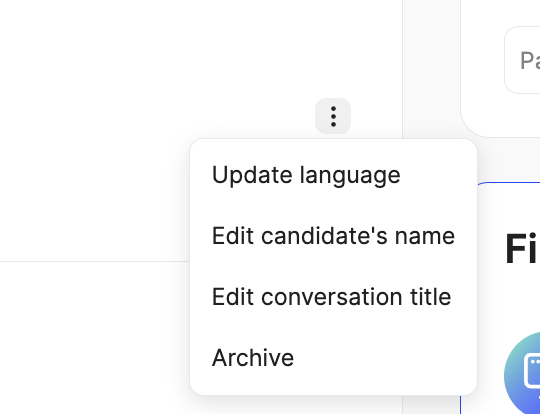
Update language, or open the call’s ⋮ (3 dots) menu and select Update language.
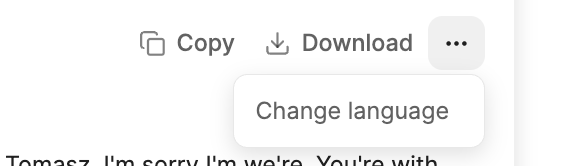
... (3 dots) menu in the transcript panel, select Change language, and pick the correct language that was spoken during the call.
Because retranscription rewrites the transcript, any manual edits you made to notes generated from the bad transcript won’t carry over. Fix the language first, then edit.
Unsupported languages
Conversations in languages that Metaview does not support, or that have not been correctly identified, show up on your home page as unavailable.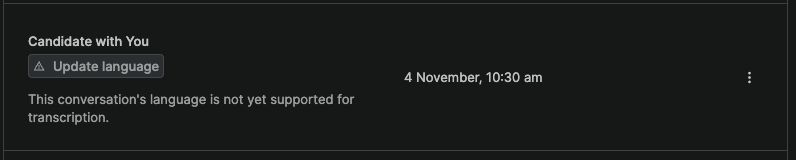
Getting a cleaner transcription
The same things that make a call hard for a person to follow make it hard to transcribe, and that effect is larger in a second language:- Ask participants to use headphones, and meet somewhere quiet where you can.
- Try not to talk over each other — overlapping speakers are the most common cause of missing words.
- Check speaker assignments after the call, so the right lines are attributed to the right person.