> ## Documentation Index
> Fetch the complete documentation index at: https://support.metaview.ai/llms.txt
> Use this file to discover all available pages before exploring further.
# Languages And Translation
> Interview in the candidate's language, read the notes in yours
Interviews get run in the language the candidate is most comfortable in, and then read by colleagues who may not speak it. Metaview handles both halves of that: it transcribes the call in the language actually spoken, and it can display the notes in whichever language the reader needs — so a screen conducted in Portuguese can be reviewed by a hiring manager in English without anyone re-writing it.
For a team hiring across markets, that removes the usual tax on non-English interviews: no summarizing from memory into a second language, and no reason to push a candidate into English so their notes are readable.
## Two different language settings
These are easy to confuse, and they behave very differently.
| | Transcription language | Display language |
| ------------------------ | ------------------------------------------------------------------------------ | ------------------------------------------------------- |
| **What it is** | The language actually spoken on the call | The language your notes and TLDR are shown in |
| **Set by** | Metaview, detected automatically from the audio | You, per conversation, with `Translate` |
| **Changing it** | Retranscribes the call from scratch and regenerates notes; takes a few minutes | Cosmetic and instant — the transcript is untouched |
| **When you'd change it** | Metaview detected the wrong language and the transcript is wrong | A colleague needs to read the notes in another language |
The short rule: fix the **transcription language** when the transcript is wrong, and use **translation** when only the reader has changed.
Afrikaans, Arabic, Armenian, Azerbaijani, Belarusian, Bosnian, Bulgarian, Catalan, Croatian, Czech, Danish, Dutch, English, Estonian, Farsi, Finnish, French, Galician, German, Greek, Hebrew, Hindi, Hungarian, Icelandic, Indonesian, Italian, Japanese, Kannada, Kazakh, Korean, Latvian, Lithuanian, Macedonian, Malay, Mandarin, Marathi, Nepali, Norwegian, Polish, Portuguese, Romanian, Russian, Serbian, Slovak, Slovenian, Spanish, Swahili, Swedish, Tagalog, Tamil, Telugu, Thai, Turkish, Ukrainian, Urdu, Vietnamese, Welsh.
## Translating notes for a colleague
Once your call is transcribed, you can **translate your notes** into any supported language, making it easy to share insights with colleagues who speak a different language, no matter the language originally spoken during the call.
You can translate your Notes and [TLDR](/notes/tldr) summary into another language at any time. This doesn't change the original transcript — it just updates how the notes are displayed, so you can switch back, or translate the same call differently for two different readers.
Click on `Translate` and select a `language` from the dropdown to translate your notes.
 Translation applies to the notes and TLDR, not the transcript or the recording. If a colleague needs to check the exact wording of an answer, they'll be reading it in the original language — so quote the original in your notes where a precise phrase matters.
## Calls with more than one language
Metaview supports multilingual transcription where multiple languages are spoken within the same call, but only for combinations of **English, Spanish, Portuguese, French, German, and Italian**.
For any other combination, only the selected primary language is transcribed — so the parts of the conversation spoken in the other language will be missing or garbled, and your notes will be incomplete rather than obviously broken. If you know a call will switch between two languages outside that set, it's worth checking the transcript before you rely on the notes.
## Fixing the transcription language
When Metaview picks the wrong language, the failure is rarely an error message. Watch for:
* Notes that come out **empty**, or with sections marked "Not discussed"
* Notes that **error when loading**
* A transcript that reads as nonsense, or as the wrong language entirely
* The call showing as **Unavailable** on your home page
Any of these usually means the audio was transcribed against the wrong language — for example, the call took place in Portuguese but Metaview transcribed it as Spanish. There are two places to fix it.
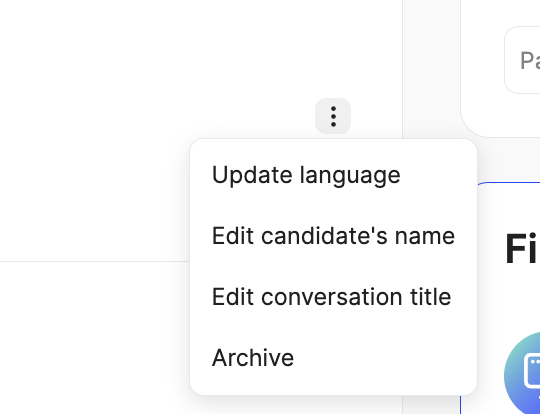
**From your home page.** If the call is unavailable because the language was not identified correctly, click `Update language`, or open the call's `⋮` (3 dots) menu and select `Update language`.
Translation applies to the notes and TLDR, not the transcript or the recording. If a colleague needs to check the exact wording of an answer, they'll be reading it in the original language — so quote the original in your notes where a precise phrase matters.
## Calls with more than one language
Metaview supports multilingual transcription where multiple languages are spoken within the same call, but only for combinations of **English, Spanish, Portuguese, French, German, and Italian**.
For any other combination, only the selected primary language is transcribed — so the parts of the conversation spoken in the other language will be missing or garbled, and your notes will be incomplete rather than obviously broken. If you know a call will switch between two languages outside that set, it's worth checking the transcript before you rely on the notes.
## Fixing the transcription language
When Metaview picks the wrong language, the failure is rarely an error message. Watch for:
* Notes that come out **empty**, or with sections marked "Not discussed"
* Notes that **error when loading**
* A transcript that reads as nonsense, or as the wrong language entirely
* The call showing as **Unavailable** on your home page
Any of these usually means the audio was transcribed against the wrong language — for example, the call took place in Portuguese but Metaview transcribed it as Spanish. There are two places to fix it.
**From your home page.** If the call is unavailable because the language was not identified correctly, click `Update language`, or open the call's `⋮` (3 dots) menu and select `Update language`.
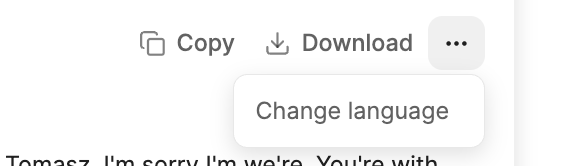
 **From the transcript.** If the call opened but the transcript is wrong, click the `...` (3 dots) menu in the transcript panel, select `Change language`, and pick `the correct` **language that was spoken** during the call.
 When you change the language, Metaview will attempt to retranscribe your call using the selected language. This will **take a few minutes** to complete, and your notes are regenerated from the new transcript afterwards.
Because retranscription rewrites the transcript, any manual edits you made to notes generated from the bad transcript won't carry over. Fix the language first, then edit.
## Unsupported languages
Conversations in languages that Metaview does not support, or that have not been correctly identified, show up on your home page as unavailable.
When you change the language, Metaview will attempt to retranscribe your call using the selected language. This will **take a few minutes** to complete, and your notes are regenerated from the new transcript afterwards.
Because retranscription rewrites the transcript, any manual edits you made to notes generated from the bad transcript won't carry over. Fix the language first, then edit.
## Unsupported languages
Conversations in languages that Metaview does not support, or that have not been correctly identified, show up on your home page as unavailable.
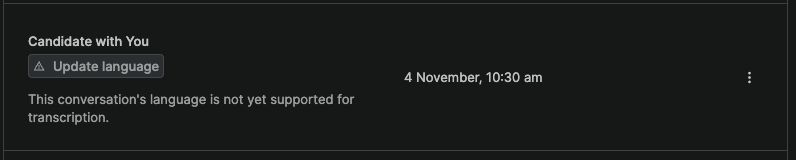 If the language *is* on the supported list, this is a detection problem — reset the language as above to retrigger processing. If it genuinely isn't supported, there's no transcript to work from; contact [support](mailto:support@metaview.ai) if you'd like to tell us which language you need.
## Getting a cleaner transcription
The same things that make a call hard for a person to follow make it hard to transcribe, and that effect is larger in a second language:
* Ask participants to use headphones, and meet somewhere quiet where you can.
* Try not to talk over each other — overlapping speakers are the most common cause of missing words.
* Check [speaker assignments](/notes/participants) after the call, so the right lines are attributed to the right person.
See [Limitations to be aware of](/notes/best-practices#limitations-to-be-aware-of) for more.
If the language *is* on the supported list, this is a detection problem — reset the language as above to retrigger processing. If it genuinely isn't supported, there's no transcript to work from; contact [support](mailto:support@metaview.ai) if you'd like to tell us which language you need.
## Getting a cleaner transcription
The same things that make a call hard for a person to follow make it hard to transcribe, and that effect is larger in a second language:
* Ask participants to use headphones, and meet somewhere quiet where you can.
* Try not to talk over each other — overlapping speakers are the most common cause of missing words.
* Check [speaker assignments](/notes/participants) after the call, so the right lines are attributed to the right person.
See [Limitations to be aware of](/notes/best-practices#limitations-to-be-aware-of) for more.