> ## Documentation Index
> Fetch the complete documentation index at: https://support.metaview.ai/llms.txt
> Use this file to discover all available pages before exploring further.
# Import Transcripts
> Upload existing transcript files to generate AI Notes in Metaview
Metaview allows you to upload an existing transcript from a conversation that wasn’t recorded through Metaview. Once imported, Metaview will generate AI Notes from the transcript, just like it does for recorded conversations.
1. Click `+ Upload conversation` on your Metaview account home page.
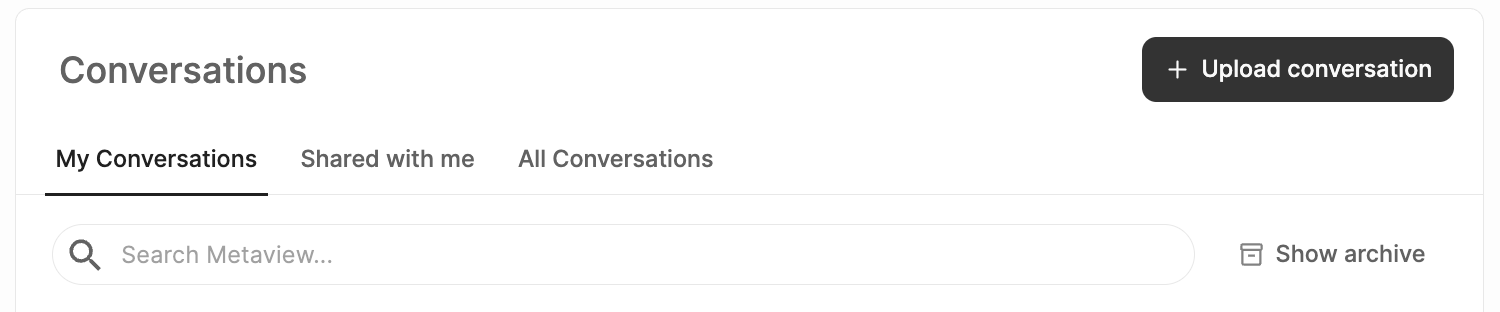 2. In the upload dialog, select `Import transcript`, then add your transcript file and complete the conversation details.
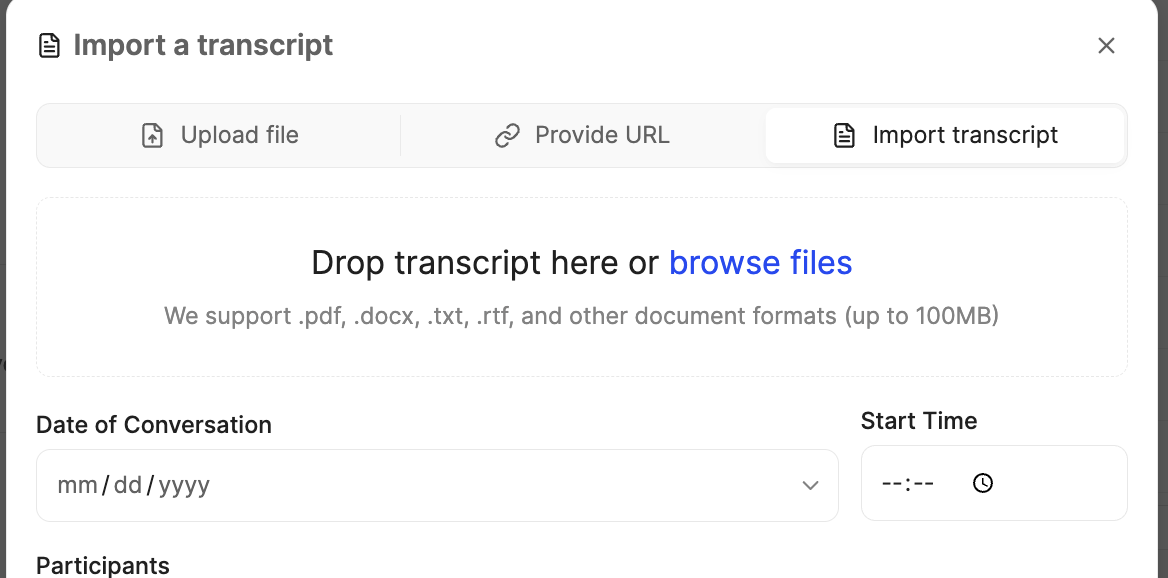 3. Click `Upload` to import your transcript. Metaview will process the file and generate AI Notes from the content.
4. Once processing is complete, the transcript and AI Notes will appear in your conversation list on the [Metaview home page](https://my.metaview.app/). They may not appear at the top of the list, so you may need to scroll to the start time you provided.
5. Normal **[Access](/using-ai-notes/notes-properties/access) rules** apply. Only participants listed as interviewers and admins will have access by default to the transcript and notes. If you upload a transcript but do **not** include yourself as a participant with the **Interviewer** role, the conversation will not appear in your list after processing.
6. You can add participants and assign roles (`Candidate` / `Interviewer`) during import, just like with a regular upload.
Your transcript does not need to follow a specific format or structure. As long as the content is human-readable, Metaview will process it and generate AI Notes.
## Supported file formats
You can import transcripts in the following formats:
* PDF
* DOCX
* TXT
* RTF
If you’re unsure whether your file format is supported, try uploading it—Metaview will let you know if there’s an issue.
## What happens after importing?
After your transcript is uploaded:
* The file is processed by Metaview
* AI Notes are generated from the transcript content
* The transcript and notes appear alongside your other conversations
* You can review, edit, and share notes as usual
If you encounter an unexpected error when importing your transcript, try closing your browser window, opening Metaview in a new tab, and uploading again. If the issue persists, please contact [us](mailto:support@metaview.ai) with details of the error.
3. Click `Upload` to import your transcript. Metaview will process the file and generate AI Notes from the content.
4. Once processing is complete, the transcript and AI Notes will appear in your conversation list on the [Metaview home page](https://my.metaview.app/). They may not appear at the top of the list, so you may need to scroll to the start time you provided.
5. Normal **[Access](/using-ai-notes/notes-properties/access) rules** apply. Only participants listed as interviewers and admins will have access by default to the transcript and notes. If you upload a transcript but do **not** include yourself as a participant with the **Interviewer** role, the conversation will not appear in your list after processing.
6. You can add participants and assign roles (`Candidate` / `Interviewer`) during import, just like with a regular upload.
Your transcript does not need to follow a specific format or structure. As long as the content is human-readable, Metaview will process it and generate AI Notes.
## Supported file formats
You can import transcripts in the following formats:
* PDF
* DOCX
* TXT
* RTF
If you’re unsure whether your file format is supported, try uploading it—Metaview will let you know if there’s an issue.
## What happens after importing?
After your transcript is uploaded:
* The file is processed by Metaview
* AI Notes are generated from the transcript content
* The transcript and notes appear alongside your other conversations
* You can review, edit, and share notes as usual
If you encounter an unexpected error when importing your transcript, try closing your browser window, opening Metaview in a new tab, and uploading again. If the issue persists, please contact [us](mailto:support@metaview.ai) with details of the error.