> ## Documentation Index
> Fetch the complete documentation index at: https://support.metaview.ai/llms.txt
> Use this file to discover all available pages before exploring further.
# Upload Recordings
> Upload audio or video recordings to Metaview for transcription
Metaview allows you to individually upload an existing audio or video recording of a conversation.
1. Click `+ Upload conversation` on your Metaview account home page.
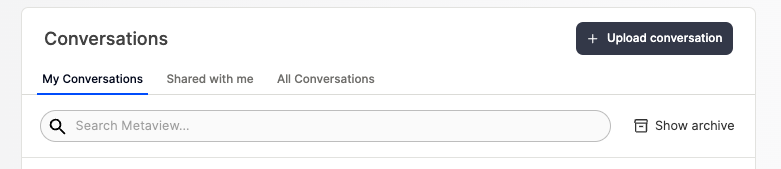
2. Select `Upload recording` or `Provide recording URL` if you have a publicly accessible video link.
3. Enter the details for your recording, add your recording file and `Upload` to Metaview. We support .wav, .mp3, .mp4, .mpeg and .mov files up to 4GB. The minimum recording duration for processing is 1 minute. 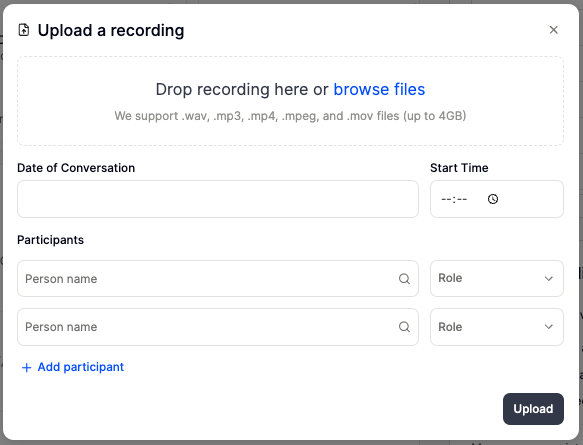 4. Your recording will be transcribed and your notes will be available within a few minutes on your [Metaview home page](https://my.metaview.app/). They will not necessarily appear at the top of the page, you may need to scroll down your list to the start time you have provided when uploading the recording.
5. Please note that the normal [Access](/using-ai-notes/notes-properties/access) rules still apply, so only call participants listed as interviewers and admins will have access by default to the transcript and notes. Therefore, even if you are the one uploading the recording, if you do not include yourself as a participant with the **role of Interviewer**, once the conversation is uploaded and processed, **it will not show up** in your conversations.
6. Once the upload is completed, you will have to manually assign speakers in the conversation, as Metaview won't know **who** is speaking **when** in the uploaded recording of your call or in-person meeting. Please see [Assigning participants](/using-ai-notes/notes-properties/assigning-participants) for details.
If you encounter an unexpected error when uploading your file, we recommend closing your current browser window, and open Metaview in a brand new browser tab, and try again. Also please ensure that the file matches the format, size, and duration requirements. If the issue persists, please reach out to [support@metaview.ai](mailto:support@metaview.ai) with details of the error you encountered.
## Adding recordings in bulk
This feature is not yet available. If you're interested in uploading a large number of recordings to Metaview, please contact [us.](mailto:support@metaview.ai)
4. Your recording will be transcribed and your notes will be available within a few minutes on your [Metaview home page](https://my.metaview.app/). They will not necessarily appear at the top of the page, you may need to scroll down your list to the start time you have provided when uploading the recording.
5. Please note that the normal [Access](/using-ai-notes/notes-properties/access) rules still apply, so only call participants listed as interviewers and admins will have access by default to the transcript and notes. Therefore, even if you are the one uploading the recording, if you do not include yourself as a participant with the **role of Interviewer**, once the conversation is uploaded and processed, **it will not show up** in your conversations.
6. Once the upload is completed, you will have to manually assign speakers in the conversation, as Metaview won't know **who** is speaking **when** in the uploaded recording of your call or in-person meeting. Please see [Assigning participants](/using-ai-notes/notes-properties/assigning-participants) for details.
If you encounter an unexpected error when uploading your file, we recommend closing your current browser window, and open Metaview in a brand new browser tab, and try again. Also please ensure that the file matches the format, size, and duration requirements. If the issue persists, please reach out to [support@metaview.ai](mailto:support@metaview.ai) with details of the error you encountered.
## Adding recordings in bulk
This feature is not yet available. If you're interested in uploading a large number of recordings to Metaview, please contact [us.](mailto:support@metaview.ai)