> ## Documentation Index
> Fetch the complete documentation index at: https://support.metaview.ai/llms.txt
> Use this file to discover all available pages before exploring further.
# Disabling Metaview
> Manually disable or manage Metaview scheduling for calls
Metaview allows you to manually disable the Notetaker bot for your upcoming scheduled events or to disable the automatic scheduling feature.
## Video conference calls
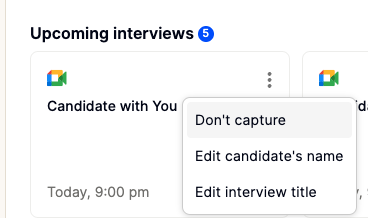
You can manually disable Metaview for a previously scheduled call in advance. Go to `your`[Metaview home page](https://my.metaview.app/), select the call under **My Conversations: Upcoming Conversations**, click on `⋮` (3 dots) and the `Don't capture` option. Admins can also manually disable on behalf of others on their team under the **All Conversations** tab.
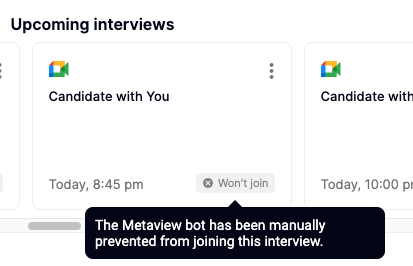
 When someone has manually disabled Metaview for a scheduled call, you will see the "**Won't join**" tag. You can access more details by hovering over it with your mouse.
 If you change your mind, you can re-enable an upcoming call that you had previously manually disabled by following the same process and selecting `Enable capture` at least 15 minutes before the call's scheduled start time. The call's tag will revert to "**Scheduled**".
## Disable automatic scheduling
You can disable Metaview from automatically scheduled events, including those picked up from your Calendar or ATS. This way, Metaview will only schedule your upcoming video conference calls if they were manually scheduled. See Manual invites for details.
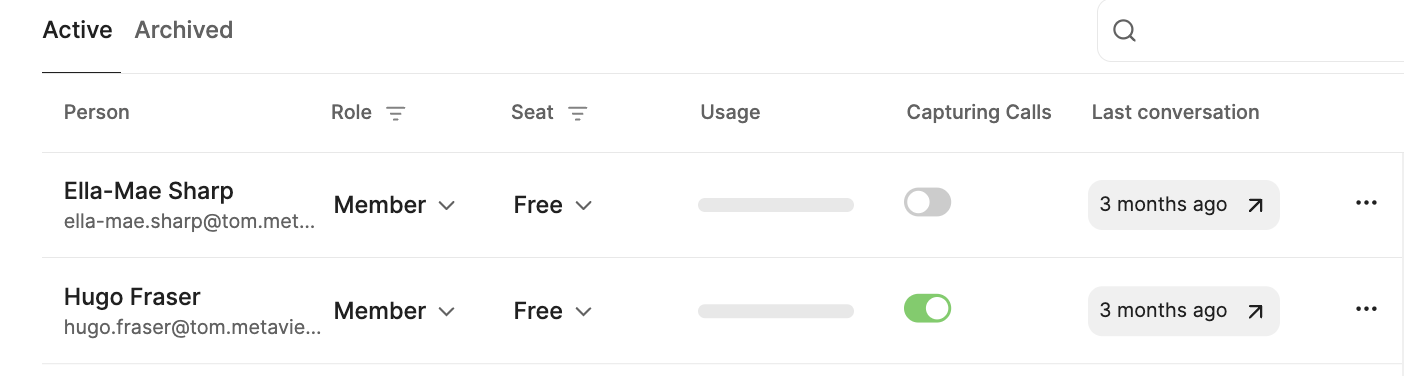
You can manage your status on the [Team Management](https://my.metaview.app/team-management) page of your account. Find your profile and change the **Capturing Calls** `toggle`. When the toggle is `enabled` Metaview will **automatically** schedule video conference calls. When the toggle is `disabled`, Metaview will only schedule calls that have been invited using Manual invites.
Account admins can control and override certain settings for their entire team under Organization Settings.
## Phone calls
Metaview won't automatically join your phone calls, even if they have been scheduled in advance. If you don't want Metaview to capture notes for a phone call, simply dial the recipient directly instead of the Metaview switchboard.
If you change your mind, you can re-enable an upcoming call that you had previously manually disabled by following the same process and selecting `Enable capture` at least 15 minutes before the call's scheduled start time. The call's tag will revert to "**Scheduled**".
## Disable automatic scheduling
You can disable Metaview from automatically scheduled events, including those picked up from your Calendar or ATS. This way, Metaview will only schedule your upcoming video conference calls if they were manually scheduled. See Manual invites for details.
You can manage your status on the [Team Management](https://my.metaview.app/team-management) page of your account. Find your profile and change the **Capturing Calls** `toggle`. When the toggle is `enabled` Metaview will **automatically** schedule video conference calls. When the toggle is `disabled`, Metaview will only schedule calls that have been invited using Manual invites.

Account admins can control and override certain settings for their entire team under Organization Settings.
## Phone calls
Metaview won't automatically join your phone calls, even if they have been scheduled in advance. If you don't want Metaview to capture notes for a phone call, simply dial the recipient directly instead of the Metaview switchboard.