> ## Documentation Index
> Fetch the complete documentation index at: https://support.metaview.ai/llms.txt
> Use this file to discover all available pages before exploring further.
# Paradox
> Configure Paradox to invite Metaview to your interviews automatically
Paradox can automatically add the Metaview Notetaker to interview calendar invites. Paradox sends standard calendar invitations and updates, so Metaview will also receive reschedules and cancellations.
This setup requires access to **Client Setup** in Paradox. Ask your Paradox representative to complete these steps if you do not have the required admin permissions.
## Before you begin
Make sure **Join events through manual invite** is enabled in your [workspace preferences](/account-management/workspace-settings).
Contact [our team](mailto:support@metaview.ai) so we can configure which interview rounds or event names Metaview should capture. Paradox adds the Notetaker to **all interview invites**.
## Configure Paradox
A Paradox representative or administrator should:
1. Go to **Settings** → **Client Setup** → **Scheduling**.
2. Under **Interview Calendar Invites**, turn on **Allow Additional Employees to be added to Interview Calendar Invites**.
3. Under **Select which employee types should be added to calendar invites on interviews they aren't attending**, select **Specific Audience**.
4. In the **Specific Audience** field, add **Metaview Notetaker** (`notes@bot.metaview.ai`).
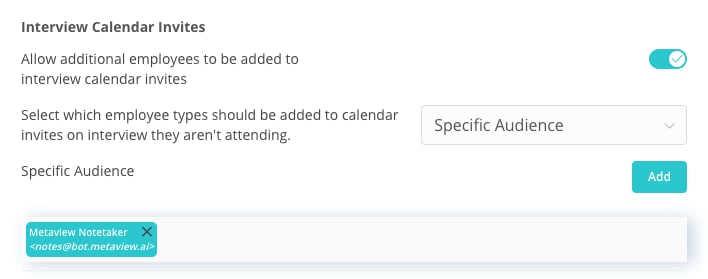 Once saved, Paradox will add Metaview to new interview calendar invites automatically. You do not need to invite the Notetaker manually for each interview.
## Verify the setup
Schedule a test interview in Paradox at least 15 minutes before its start time and confirm that:
* `notes@bot.metaview.ai` appears as a guest on the calendar invite
* The invite contains a supported video conference link
* Metaview appears under **Upcoming conversations** on your [Metaview home page](https://my.metaview.app)
If the test interview does not appear, contact [support@metaview.ai](mailto:support@metaview.ai) with the calendar invite and the event name or interview round.
Once saved, Paradox will add Metaview to new interview calendar invites automatically. You do not need to invite the Notetaker manually for each interview.
## Verify the setup
Schedule a test interview in Paradox at least 15 minutes before its start time and confirm that:
* `notes@bot.metaview.ai` appears as a guest on the calendar invite
* The invite contains a supported video conference link
* Metaview appears under **Upcoming conversations** on your [Metaview home page](https://my.metaview.app)
If the test interview does not appear, contact [support@metaview.ai](mailto:support@metaview.ai) with the calendar invite and the event name or interview round.